


Know who is on site. Account for everyone fast.
CheckSync helps operational sites manage visitors, contractors, guests, staff and agency workers through tablet terminals, web dashboards, biometric verification and emergency roll call workflows.
Operational visibility
Paper logs and disconnected systems leave too much uncertainty.
Sites need a faster way to understand who is present, who has left, who is expected, and who must be accounted for during an emergency.
Visitor books are slow and incomplete
Paper records can be hard to read, difficult to search and unreliable when people forget to sign out.
Contractor presence is often fragmented
Contractors may arrive through different routes, work across multiple areas and leave without a clear digital trail.
Agency worker attendance needs stronger controls
Sites using temporary labour need better evidence that the right person signed in and attended the shift.
Emergency lists can become outdated quickly
In a fire drill or real incident, teams need a live view of people on site, not a spreadsheet or paper book.
Managers need audit-ready information
Health and safety, security and management teams need records that can be filtered, reviewed and exported.
Support matters after deployment
CheckSync is positioned as a product and service partnership, with direct support available under agreement.
Platform
Every person on site, accounted for.
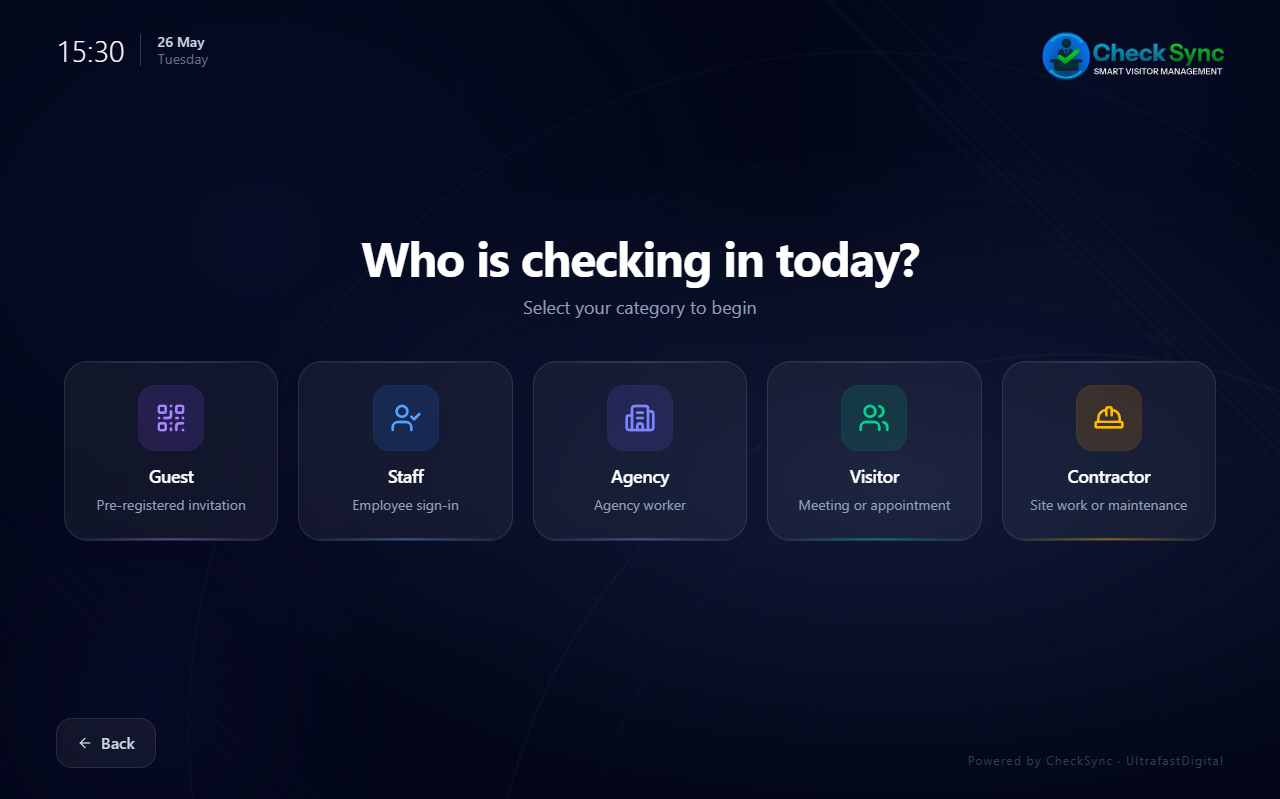
CheckSync handles five distinct person types through the same tablet terminal, each with its own tailored check-in flow and sign-out process.
Visitors
Guided check-in collects name, company, purpose of visit, host selection and site induction notices including health and safety, emergency evacuation and site rules. Optional photo and vehicle registration. Host is notified on arrival.
- GDPR consent before any data is collected
- Health & safety and evacuation notices with confirmation
- Host notification on arrival
- Optional photo and vehicle registration
Contractors
Same guided flow as visitors with an additional work permit notice step. Contractors confirm site rules, H&S procedures and permit conditions before signing in. Creates a timestamped audit record per visit.
- Work permit notice step included
- Purpose of work and host selection
- Full site induction confirmation
- Timestamped audit record per visit
Guests
Pre-registered guests arrive with a QR code sent by their host. The terminal reads it via camera or hardware scanner, shows the invitation details and checks them in instantly. No manual data entry required.
- QR code sent to guest by their host
- Camera or hardware scanner — dual path
- Invitation details shown before confirmation
- No manual data entry at the terminal
Staff
Staff sign in by scanning their personal QR code or searching by name. The terminal confirms their identity and records a timestamped sign-in. Sign-out follows the same fast dual-path flow.
- QR scan or name search — dual path
- Identity confirmation before sign-in
- Timestamped sign-in and sign-out records
- Offline queue — syncs when connection returns
Agency Workers
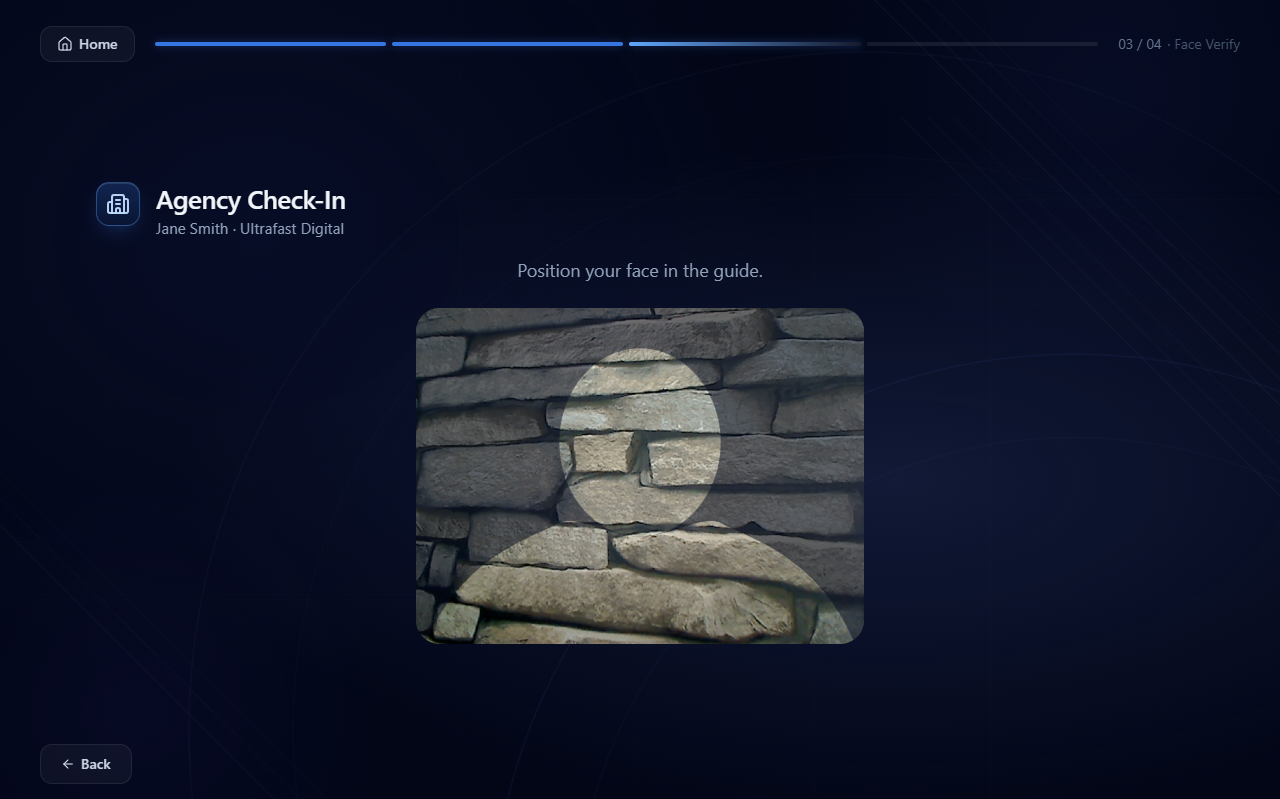
Agency workers select their agency, enter their name and complete a face biometric verification step. The terminal compares a live capture against their enrolled identity. Three attempts allowed before escalating to security.
- Agency selection from site-registered list
- Face biometric verification — auto-capture
- Live comparison against enrolled identity
- Three attempts before security escalation
Emergency Roll Call
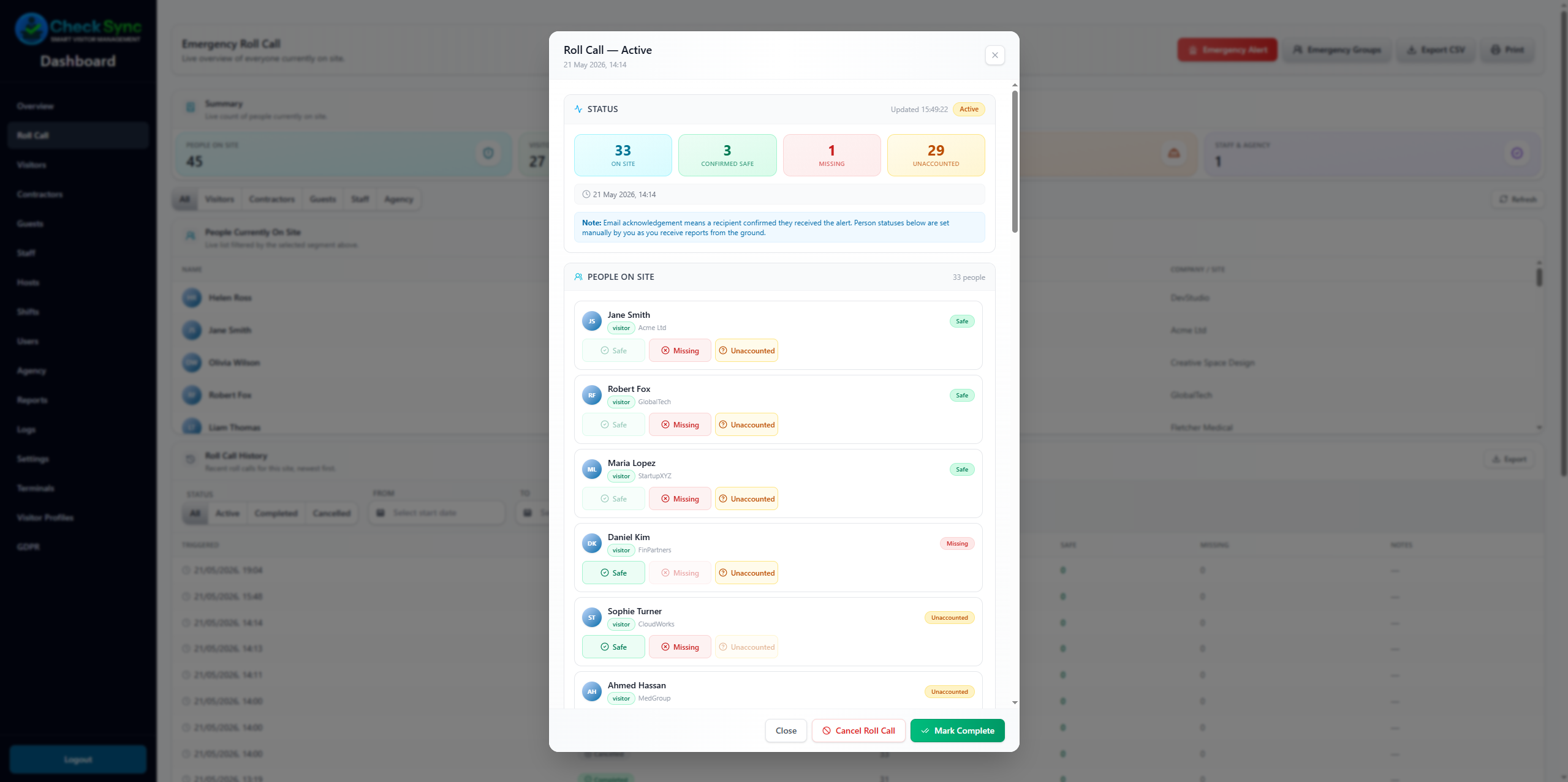
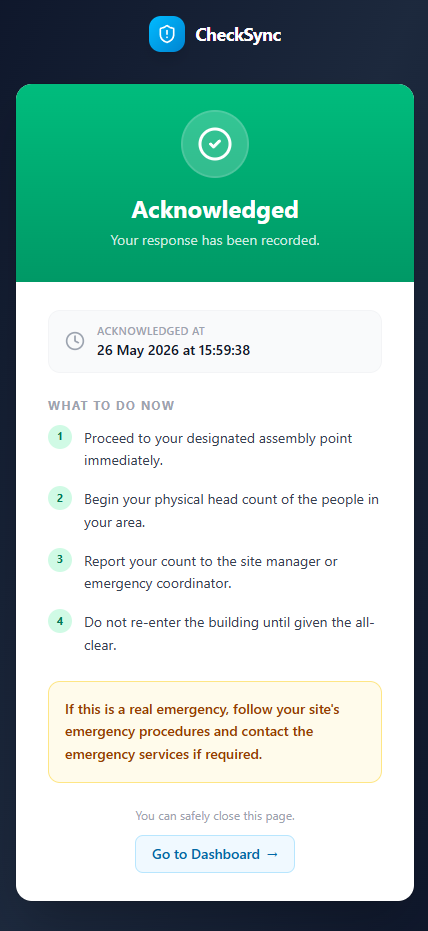
Triggered from the dashboard or directly from the terminal. All on-site persons are listed with safe, missing and unaccounted statuses. Emergency responders receive an email with a one-tap acknowledge link — no login required.
- Triggered from dashboard or terminal PIN
- Live safe / missing / unaccounted counts
- One-tap email acknowledge — no login needed
- Full history with export
Agency worker verification
The right person signed in. Every shift.
Agency workers complete a face biometric verification step on the terminal before every sign-in and sign-out. CheckSync compares a live capture against the worker's enrolled identity — helping reduce proxy attendance risk and creating timestamped presence evidence for every shift.
Agency selection
Workers select their agency from the site-registered list before any other step.
Auto-capture verification
MediaPipe face detection guides positioning. Capture fires automatically when the face is centred and steady — no button press required.
Identity comparison
A live mathematical embedding is compared against the worker's enrolled reference. No face photographs are stored.
Three-attempt limit
Up to three verification attempts allowed. After three failures the terminal directs the worker to the security office.
Requires live connection
Biometric verification always runs against the live server. Embeddings are never cached on the terminal device.
Timestamped shift record
Every verified sign-in and sign-out creates a timestamped audit record linked to the worker, agency and site.
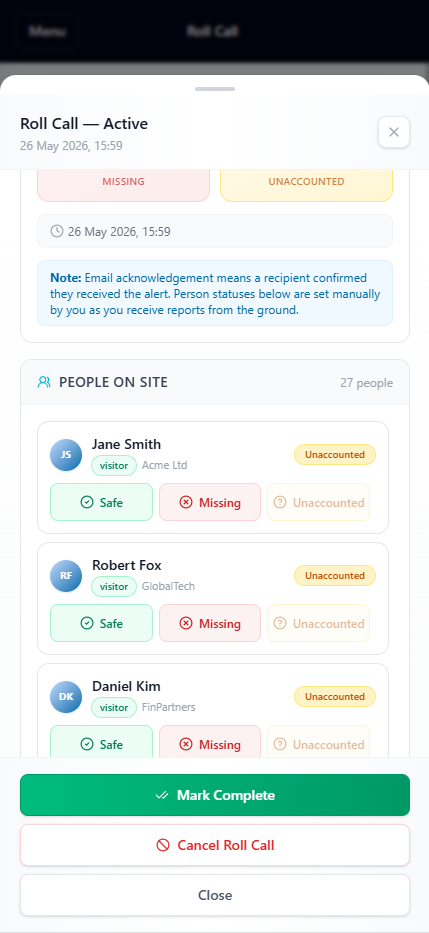
Emergency roll call
Account for everyone. In minutes.
When an emergency happens, CheckSync gives you a live list of everyone on site — visitors, contractors, guests, staff and agency workers — with their current status. Trigger from the dashboard or directly from the terminal.
One-tap trigger
Send a roll call from the dashboard or via the terminal emergency PIN. All on-site persons are listed immediately.
Live status counts
Safe, missing and unaccounted counts update in real time as your team marks people on the ground.
Emergency group alerts
Notify first aid, fire marshals and site management simultaneously. Each group receives its own roll call email.
No login required for responders
Responders receive an email with a one-tap acknowledge link. No app, no login, no delay.
Mobile-ready management
Mark people safe or missing directly from a phone. The roll call modal works on any device without installing anything.
Full history and export
Every roll call is logged with timestamps, status changes and a CSV export for incident records and compliance evidence.
Offline-ready operation
Works when the network doesn't.
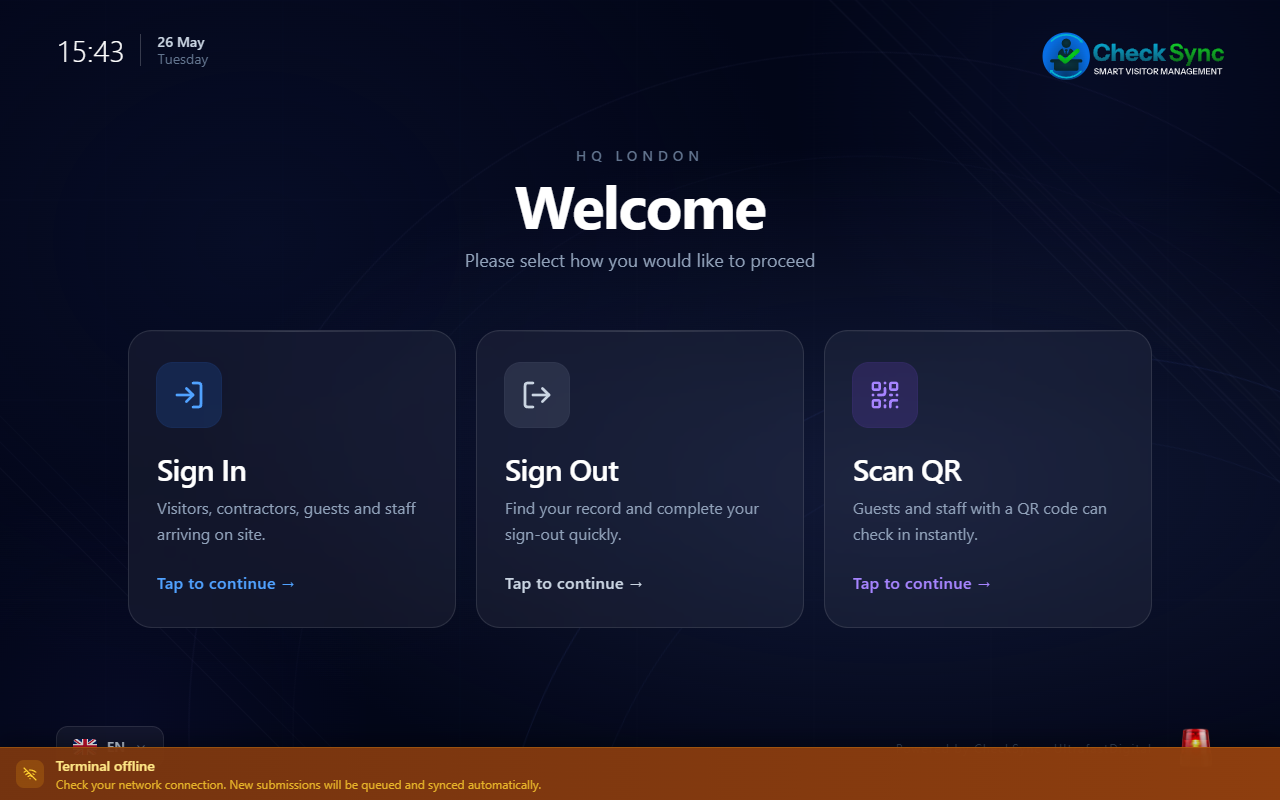
CheckSync terminals are designed for operational environments where WiFi is unreliable or unavailable. Sign-ins queue locally and sync automatically when connectivity returns — no data is lost and no manual intervention is needed.
Automatic offline queue
Visitor, contractor, guest, staff and agency sign-ins queue silently when offline. The terminal continues operating without interruption.
Syncs on reconnect
Queued submissions replay automatically in order when the connection is restored. No manual steps required.
4G/5G SIM ready
Deploy on Android or iOS tablets with a SIM card for sites with poor or no WiFi. No heavy IT infrastructure project required.
Survives app restart
The queue persists through app backgrounding, crashes and device restarts. Stored securely on-device, never in the browser.
Biometric correctly blocked
Agency face verification requires a live server connection and is intentionally blocked offline preserving the identity security guarantee.
Visible queue status
An amber connectivity banner shows operators the offline state and pending queue count at all times.
Web dashboard
Full visibility. Every site. Every role.
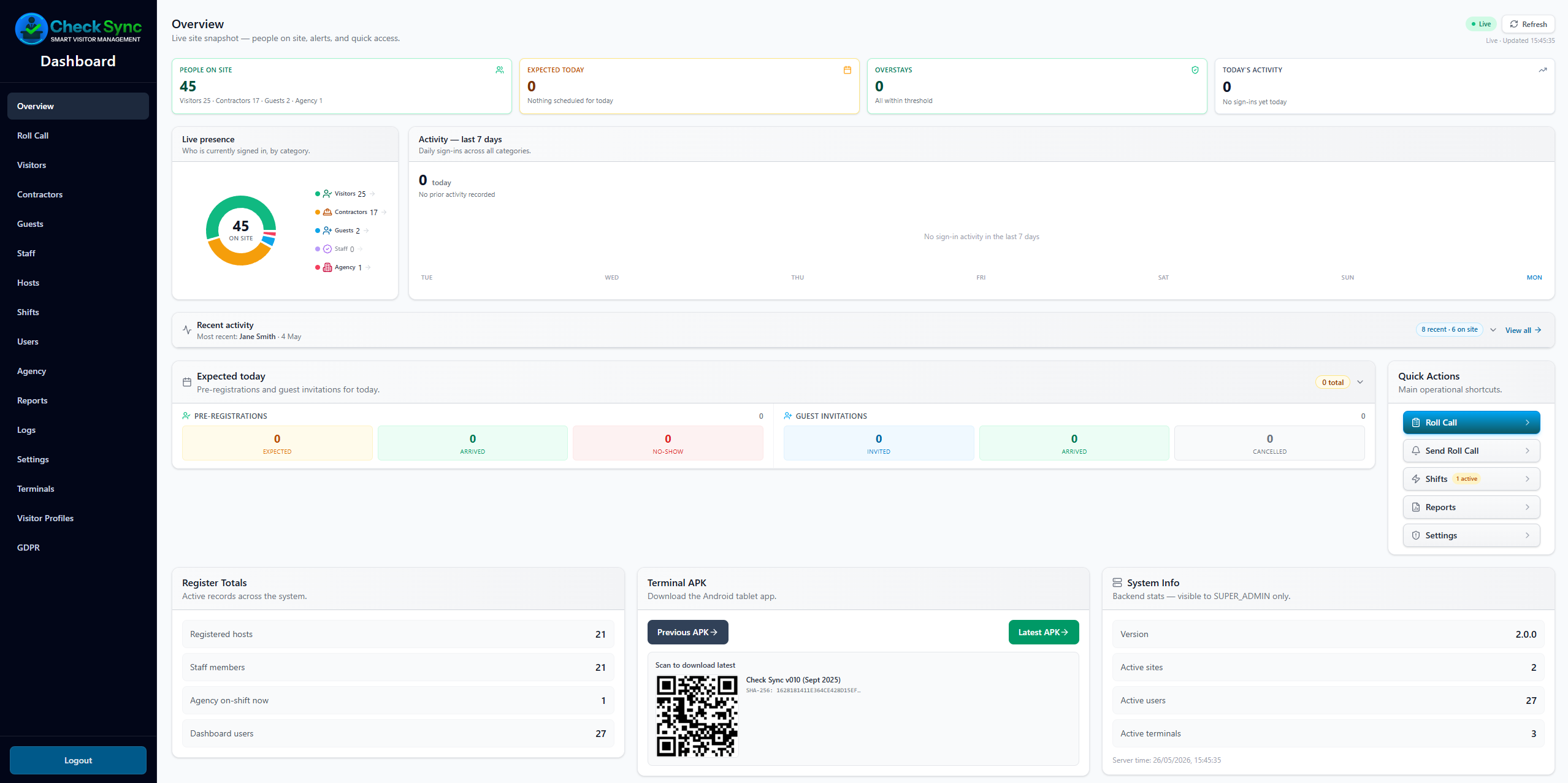
The CheckSync dashboard gives operations, security, HR and health & safety teams a live view of everyone on site — with the depth, filtering and audit records each role needs.
Live on-site overview
See visitors, contractors, guests, staff and agency workers on site in real time. Pie chart breakdown, activity graph and overstay alerts all on one screen.
Per-person-type screens
Dedicated screens for visitors, contractors, guests, staff, hosts, shifts and agency workers — each with filters, search and detailed records.
Reports and exports
On-site snapshots, site activity, visitor reports, contractor records, staff attendance, roll call history and agency shift reports — all exportable to CSV.
Audit logs
Append-only platform and biometric audit logs. Every action is timestamped, categorised and filterable by actor, role, site, category and severity.
11 role types
Company Admin, Site Manager, HR, H&S, Security, Receptionist, Agency Admin, Finance, Viewer and more — each with scoped access to the screens they need.
GDPR tools
Data export, right to erasure and consent record tooling built into the dashboard. Biometric audit log with independent retention separate from operational records.
Support
Direct support. From the people who built it.
CheckSync is a product and service partnership. Every client deployment comes with a signed support agreement covering direct access to the team behind the product — not a helpdesk, not a ticket queue.
Direct line
Phone and email support direct to the CheckSync team. No intermediaries, no offshore call centres.
Signed support agreement
Support scope, response expectations and escalation paths are agreed in writing before go-live.
Deployment assistance
Terminal provisioning, dashboard setup and user onboarding handled directly alongside your team.
Ongoing updates
Product updates, security patches and new features are delivered continuously under the agreement.
Training included
Reception, security and management staff training included at deployment and on request.
Pilot-first approach
Every new client starts with a structured pilot — real hardware, real data, real workflows — before full rollout.
Industries
Built for operational sites.
CheckSync is used across sectors where knowing who is on site, verifying workers and accounting for everyone in an emergency is a daily operational requirement.
Logistics & Courier Depots
Agency worker verification, shift accountability and emergency roll call for high-turnover depot environments.
Warehousing & Distribution
Seasonal workforce management, contractor records and offline-ready terminals for large distribution sites.
Manufacturing
Contractor sign-in, staff attendance, agency verification and emergency preparedness for factory floors.
Construction Sites
Visitor and contractor records, site safety notices and emergency roll call for active construction environments.
Schools & Universities
Visitor visibility, contractor records and emergency roll call for educational premises and safeguarding-aware environments.
Healthcare & Care Facilities
Contractor and visitor records, audit history and emergency preparedness for healthcare premises.
Government Buildings
Professional visitor management, role-based dashboard access and audit records for public sector premises.
Office Buildings
Branded visitor check-in, host notifications, guest invitations and live on-site visibility for corporate offices.
Security Providers
CheckSync as a complementary software layer for security and access-control providers managing multiple client sites.
Pricing
Simple, deployment-first pricing.
CheckSync is priced per site, not per user or per visitor. No surprise bills as your operation grows. Every deployment is quoted based on your sites, person types and support requirements.
Starter
One site. Core check-in flows for visitors, contractors, guests and staff. Ideal for offices, schools and single-entrance sites moving away from paper.
- Visitor and contractor check-in
- Guest QR invitation flow
- Staff QR sign-in
- Live dashboard overview
- Basic reports and CSV export
- Single site
- Up to 3 dashboard users
- Email support under signed agreement
Professional
Multi-site. Full platform including agency biometric verification and emergency roll call. Recommended for any site using agency or temporary labour.
- Everything in Starter
- Agency worker face biometric verification
- Emergency roll call
- Offline / 4G-ready terminal operation
- Full platform and biometric audit logs
- Multi-site support
- Up to 10 dashboard users
- 11 role types
- Phone and email support under signed agreement
Enterprise
Unlimited sites. Custom support agreement. Direct deployment partnership for large or complex operations.
- Everything in Professional
- Unlimited sites
- Unlimited dashboard users
- Custom support agreement
- Deployment assistance included
- Staff training included
- Priority direct line support
- Ongoing product updates
Software is priced per site per month. Hardware is sourced separately — standard consumer devices, no proprietary equipment. Contact us for a tailored quote based on your sites, person types and support requirements.
What hardware do you need?
One device per site entrance. CheckSync runs on hardware you can source locally — no proprietary equipment, no corporate device management software, no IT project.
Android tablet
RecommendedNative APK, deepest feature set. Samsung Galaxy Tab A9 or similar — from approximately £150–£250. Full kiosk mode built in, no third-party software required.
iPad / iOS
PWA — no App Store required. Any iPad with Guided Access enabled becomes a kiosk in under a minute. No MDM, no Apple Business Manager, no corporate licence.
Windows AIO / Surface
Browser-based PWA. Any Windows touchscreen or AIO kiosk works. Windows kiosk user account available for lockdown — no third-party kiosk software needed.
Optional peripherals
Optional: HID USB or Bluetooth QR scanner (from £30–£80) for faster staff sign-in. Any device camera of 5MP or above is sufficient for agency face biometric verification — most modern tablets qualify.
Terminal setup
Terminal provisioning takes under 2 minutes — scan a QR code, enter your site key, done. Assisted by CheckSync at go-live. No IT department needed.
Not sure where to start?
Every new client begins with a structured pilot on one site — real hardware, real data, real workflows. CheckSync handles provisioning and setup. No commitment until you are satisfied it works for your operation.
FAQ
Common questions.
What is CheckSync?
CheckSync is a site workforce and visitor management platform for operational premises. It helps businesses manage visitors, contractors, guests, staff and agency workers through tablet-based check-in, a web dashboard, agency worker face biometric verification, emergency roll call, offline-ready terminal operation and GDPR-conscious audit records — all supported by direct 24/7 human support under a signed agreement.
Does CheckSync verify agency workers?
Yes. Agency workers complete a face biometric verification step on the terminal before every sign-in and sign-out. CheckSync compares a live capture against the worker's enrolled identity using mathematical embeddings. No face photographs are stored. Beyond identity verification, this creates a timestamped, verifiable presence record for every agency worker, every shift — giving operations and finance teams the evidence they need to reconcile agency invoices and challenge unjustified billing with confidence. In high-volume environments such as warehouses, logistics depots and production factories, proxy sign-ins can silently inflate agency bills with hours that were never actually worked. Without a verification step, these discrepancies are difficult to challenge and nearly impossible to prove. On the regulatory side, the Agency Worker Regulations 2010 require organisations to maintain robust records of hours worked and payments made for agency workers. The Employment Rights Act 2025 has extended further protections to agency workers including zero-hours contract rights. Critically, the UK Fair Work Agency launched on 7 April 2026 as a new single enforcement body, consolidating enforcement of National Minimum Wage, agency worker protections and gangmaster licensing under one roof, with powers to enter premises, inspect records and issue civil penalties. From 6 April 2026, employers must also keep records for six years demonstrating compliance with workers' holiday and pay entitlements — failure is a criminal offence. The FWA has stated it will initially target high-risk sectors with poor compliance records — which includes logistics, warehousing and manufacturing sites using agency labour. The UK Home Office also updated its Modern Slavery Act guidance in March 2025, placing stronger emphasis on supply chain due diligence and verifiable evidence of workforce accountability. CheckSync is designed to support this evidence trail — not as a legal compliance guarantee, but as a practical operational tool that helps businesses demonstrate they are taking workforce accountability seriously.
Does CheckSync store face photos?
No. CheckSync stores mathematical embeddings only — not photographs. The verification process captures a live image, converts it to a numerical representation, compares it against the enrolled reference and discards the capture. This approach is designed to align with GDPR Article 9 principles on biometric data.
Can CheckSync work without WiFi?
Yes. CheckSync terminals queue sign-ins locally when offline and sync automatically when connectivity is restored. No data is lost and no manual intervention is required. Agency worker face biometric verification requires a live connection and is intentionally blocked offline to preserve the identity security guarantee. 4G and 5G SIM-equipped tablets are supported for sites with poor or no WiFi.
Can emergency responders use their phones?
Yes. When a roll call is triggered, emergency group members receive an email with a one-tap acknowledge link. No app, no login and no CheckSync account is required. The roll call management screen also works fully on any mobile browser, allowing site managers to mark people safe or missing from the ground.
What hardware is required?
One device per site entrance. CheckSync runs on Android tablets (native APK), iPads and iOS devices (PWA — no App Store required), and Windows AIO touchscreens (browser PWA). No proprietary hardware, no corporate device management software and no IT infrastructure project is required. A standard Android tablet such as a Samsung Galaxy Tab A9 is available for approximately £150–£250. An optional HID QR scanner (from £30–£80) speeds up staff sign-in.
Is support included?
Yes. Every CheckSync deployment includes direct support under a signed support agreement. This covers phone and email access to the CheckSync team directly — not a helpdesk or ticket queue. Support scope, response expectations and escalation paths are agreed before go-live.
Can we run a pilot first?
Yes — and this is how every new client starts. A structured pilot on one site uses real hardware, real data and real workflows. CheckSync handles terminal provisioning and setup. There is no commitment to a full rollout until you are satisfied the system works for your operation.
Does CheckSync replace access control gates or door entry systems?
No. CheckSync is a presence and accountability platform, not an access control system. It records who is on site, verifies identities and supports emergency roll call — but it does not control physical access. It can operate alongside existing access control or door entry systems without conflict. On request, CheckSync can be integrated with fire alarm panels to trigger an automatic roll call when an alarm is activated — removing the need for manual intervention during an emergency. Integration with existing access control systems is also possible for clients who require a connected presence and access record. These are available as additional features discussed during deployment planning, based on your site's specific infrastructure and requirements.
Ready to get started?
Know who is on site. From day one.
Start with a structured pilot on one site. Real hardware, real data, real workflows. No commitment until it works for your operation.
Every deployment starts with a pilot. Direct support included from day one.